How to use this R44 HOGE and HIGE calculator
- Pick your model: Raven II (2,500 lb max gross), Raven I (2,400 lb) or Cadet (2,200 lb), and choose HOGE or HIGE.
- Enter your gross weight. If you have just done your weight and balance on this site, the takeoff weight carries across when you follow the hover ceiling link from the results.
- Enter the outside air temperature at the landing site or pad.
- Read the maximum hover altitude. It is a pressure altitude, so compare it with your altimeter set to 1013 hPa / 29.92 inHg, or with the site elevation corrected for QNH. The chart shows the POH OAT lines, your interpolated OAT line in blue, and the crosshair going up from your weight and across to the answer, exactly as you would rule it on the paper chart.
How the R44 hover ceiling chart works
The POH charts plot gross weight against pressure altitude with one line per 10°C of outside air temperature. To read one by hand you go up from your gross weight to your OAT line, then across to the altitude axis and read the maximum pressure altitude. Between two OAT lines you interpolate. This calculator does exactly that: each POH line is stored as a series of points, the two lines either side of your temperature are read at your weight, and the answer is interpolated linearly between them, the same method as in the Tool in the Cockpit app. The crosshair on the chart is the ruler.
Every line starts at a dashed density altitude limit (11,800 ft on the Raven II charts, 11,600 ft on the Raven I and Cadet). Above that Robinson has not substantiated hover performance, so the calculator caps the answer there for light weights and tells you when the limit, rather than engine power, is what stops you. On the OGE charts the warm lines bend sharply near maximum gross weight, which is where full throttle runs out; the calculator follows those knees.
The conditions are the POH ones: zero wind, takeoff power or full throttle for OGE, full throttle at a 2 foot skid height for IGE. Performance under other conditions may be substantially less, and a tired engine or a dirty airframe will not match the chart.
Which R44 hover charts are included
- R44 Raven II: HIGE and HOGE, R44 II POH Section 5, FAA approved 3 Oct 2002. OAT lines from -30°C to +40°C, density altitude limit 11,800 ft, 17 knot IGE controllability to 9,800 ft density altitude.
- R44 Raven I: HIGE and HOGE, R44 POH Section 5, FAA approved 16 Aug 2001. OAT lines from -20°C to +40°C, density altitude limit 11,600 ft, 17 knot IGE controllability to 9,600 ft density altitude.
- R44 Cadet: HIGE and HOGE, R44 Cadet POH Section 5, FAA approved 21 Oct 2016. OAT lines from -30°C to +40°C, density altitude limit 11,600 ft, 17 knot IGE controllability to 9,600 ft density altitude.
R44 hover ceiling FAQ
What is the difference between HIGE and HOGE?
HIGE is hover in ground effect, measured at a 2 foot skid height in the R44 POH. The ground cushion reduces the power needed, so HIGE ceilings are higher than HOGE. HOGE is hover out of ground effect, which is what you need for a vertical departure or arrival over obstacles, a confined area, a pinnacle or a sling load. If your HOGE ceiling is below the landing site elevation, you can still land and lift off in ground effect, but you have no margin to hover away from the ground.
What is the R44 HOGE ceiling at max gross weight?
On a standard day the R44 Raven II can hover out of ground effect at 2,500 lb up to roughly 4,100 ft pressure altitude; at ISA +20 that drops to about 1,600 ft. The Raven I at 2,400 lb hovers OGE to about 2,000 ft on a standard day, and the Cadet at 2,200 lb to roughly 5,200 ft. In ground effect the figures are about 8,800 ft, 6,300 ft and 8,700 ft. Use the calculator above for your exact weight and temperature.
Which R44 hover chart should I use?
The Raven II (Lycoming IO-540, fuel injected) has its own charts in the R44 II POH with a 2,500 lb maximum gross weight. The Raven I and the original R44 Astro (O-540, carburetted) use the R44 POH charts at 2,400 lb. The R44 Cadet uses the R44 Cadet POH charts at 2,200 lb. Pick the matching aircraft in the calculator. The charts here are from the FAA approved POH revisions listed under the inputs; check your own POH for any later revision or supplement.
What does the density altitude limit on the chart mean?
Robinson only substantiates hover performance up to 11,800 ft density altitude for the Raven II and 11,600 ft for the Raven I and Cadet. That is the dashed line at the top left of each POH chart. For light weights the calculator caps the maximum hover altitude at that line and tells you so, because the POH gives no data above it. Separately, IGE hover controllability in a 17 knot wind is only substantiated up to 9,800 ft density altitude (Raven II) or 9,600 ft (Raven I and Cadet).
The answer is a pressure altitude. How do I compare it with my landing site?
Set 1013.25 hPa (29.92 inHg) on the altimeter subscale and read the altitude, then check it is below the maximum hover altitude. If you only know the site elevation and the QNH, add roughly 27 ft for every hPa the QNH is below 1013 (about 1,000 ft per inch of mercury below 29.92), or subtract if it is above.
Why is the R44 hover ceiling so sensitive to temperature?
Hot air is less dense, so the rotor produces less lift and the normally aspirated Lycoming produces less power. Each 10°C rise typically costs the R44 around 600 to 900 ft of hover ceiling at a given weight, or 50 to 80 lb of hover weight at a given altitude. That is why a load that hovers comfortably in the morning can be marginal in the afternoon.
Does the calculator account for wind?
No. The POH charts are for zero wind. A headwind gives you translational lift and improves hover performance, so zero wind is the conservative case, but a tailwind or gusty conditions can make things worse than the chart. Also remember the 17 knot controllability limit for IGE hover above 9,600 or 9,800 ft density altitude.
Can I see my HOGE in flight, without stopping to use a chart?
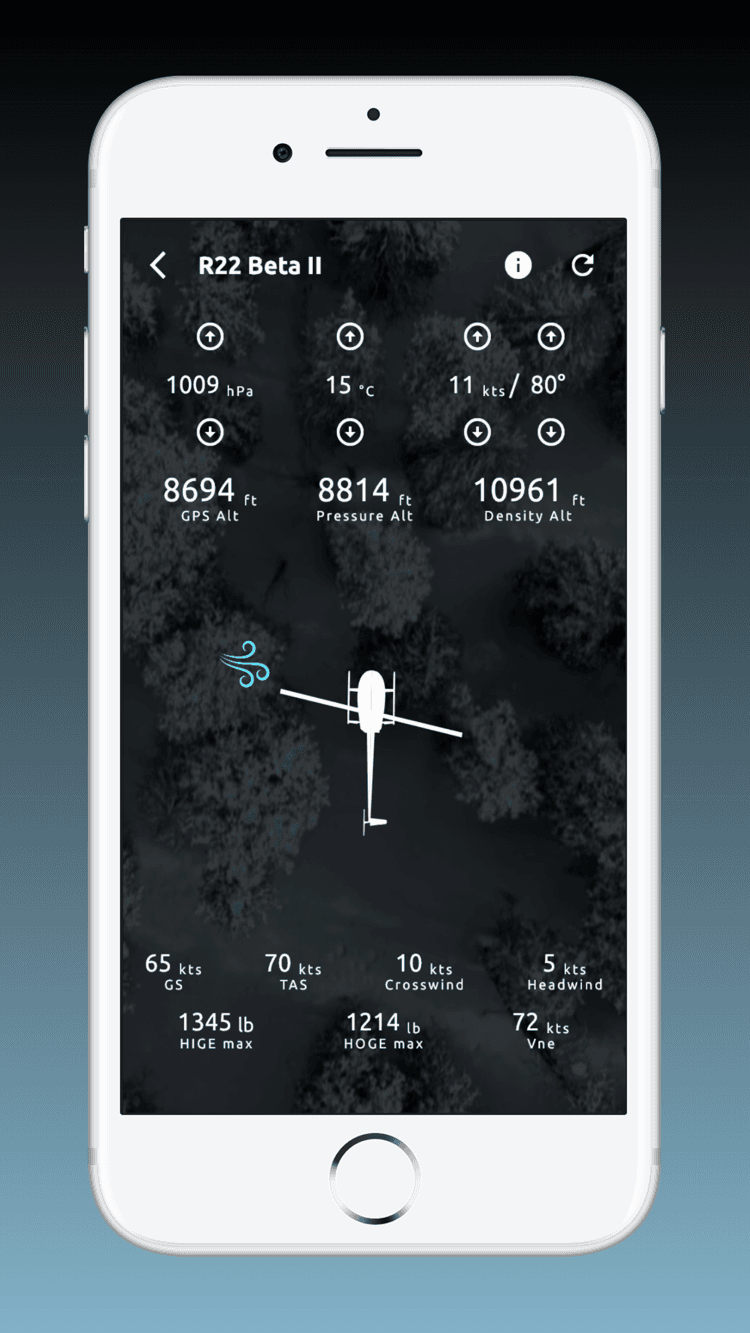
Yes, that is what the flight screen in the free Tool in the Cockpit app is for. It reads your phone's GPS altitude, pulls QNH and temperature from the nearest METAR (you can nudge them to match your OAT gauge), and continuously shows pressure altitude, density altitude and the maximum weight at which you can hover in and out of ground effect at that moment, alongside your crosswind and headwind components and Vne. So on the way to a high landing site you can watch your HOGE margin instead of estimating it.
Is this R44 hover ceiling calculator free?
Yes. It runs entirely in your browser with no account. The Raven II data was taken from the Tool in the Cockpit app and re-checked against the R44 II POH chart; the Raven I and Cadet charts were digitised directly from their POHs. If you want the same charts offline on your phone, with HIGE and HOGE updating live from GPS altitude and temperature in flight, download the free Tool in the Cockpit app.